

MS445186PM-48G6+ Medical Gigabit Ethernet Switch
Managed medical Gigabit Ethernet switch
Price on request

Medical equipment and biomedical engineering.
Abuja, Nigeria.
Buy medical network switches for hospitals in Nigeria through Franance by matching the connected-device plan to the exact isolated ports, uplink, power role, mounting and network management requirements. The current category lists MICROSENS MS445186PM-48G6+ and MS445209PM-48G6+. Their copper/fibre and PoE configurations differ, so confirm the exact port map and network design before quotation.
2 models
Managed medical Gigabit Ethernet switch
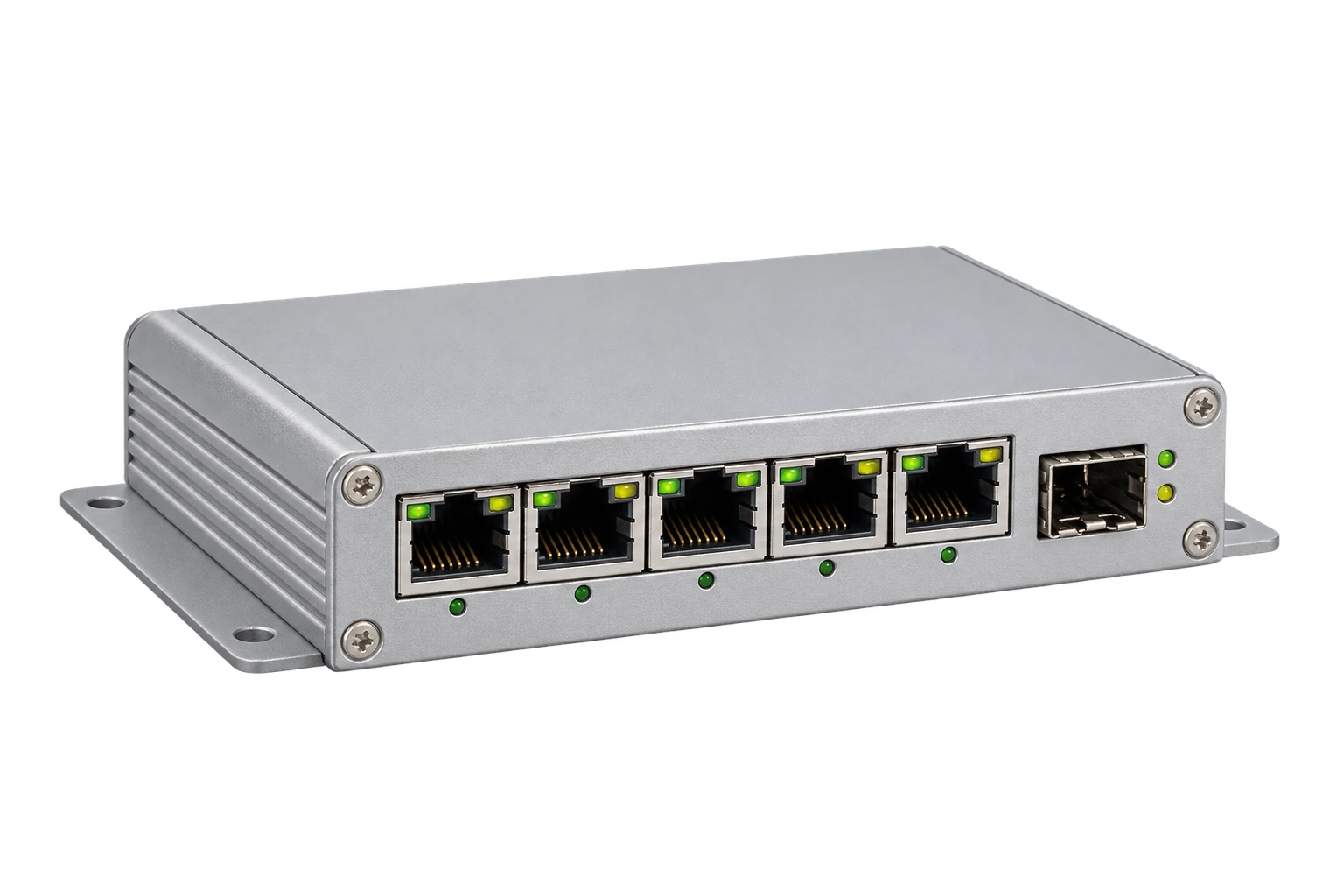
Browse the hospital-grade network switch category. It currently lists two MICROSENS products. Use the MS445186PM-48G6+ filter and the MS445209PM-48G6+ filter to isolate each exact model.
Read moreA managed Ethernet switch connects networked equipment and forwards traffic between its ports according to its configuration. A medical network switch adds manufacturer-designed isolation at designated ports and may be specified for use around medical equipment. MICROSENS describes its six-port medical switches as including four integrated RJ45 network isolators with a dielectric strength above 4 kV and 2 MOPP according to IEC/EN 60601-1. These are manufacturer statements about designated interfaces and the product family.
Read moreFranance currently assigns exactly two MICROSENS items to healthcare-it/clinical-it-infrastructure/network-switch-hospital-grade:
Buy a medical network switch for a hospital in Nigeria through Franance by mapping the connected equipment, required patient-protection isolation, uplink, power input, mounting and network-management plan before choosing a model. The current Franance category contains two MICROSENS six-port managed medical switches: MS445186PM-48G6+ and MS445209PM-48G6+. Their copper/fibre and power configurations differ. MICROSENS publishes 2 MOPP isolation for designated network ports in this product family; that claim does not certify the complete hospital network or every connected device. Confirm the exact port mapping and system design with your biomedical engineering, clinical engineering and network teams.
Browse the hospital-grade network switch category. It currently lists two MICROSENS products. Use the MS445186PM-48G6+ filter and the MS445209PM-48G6+ filter to isolate each exact model.
Franance handles these as quote orders, not online checkout. Send the exact part number, connected-device plan, intended port assignment, power source, required SFP/fibre type, mounting, VLAN and network-access-control needs, quantity and delivery destination in Nigeria. Ask the quote to specify the current hardware and firmware revision, included power supply and accessories, configuration work and support terms. The listing does not confirm local stock, price, delivery, installation or service coverage.
A managed Ethernet switch connects networked equipment and forwards traffic between its ports according to its configuration. A medical network switch adds manufacturer-designed isolation at designated ports and may be specified for use around medical equipment. MICROSENS describes its six-port medical switches as including four integrated RJ45 network isolators with a dielectric strength above 4 kV and 2 MOPP according to IEC/EN 60601-1. These are manufacturer statements about designated interfaces and the product family.
“Medical” or “hospital-grade” in a catalogue title does not mean the device is suitable for every hospital port or that the complete connected medical electrical system complies with a standard. Isolation applies only where the manufacturer identifies it; uplinks, PoE inputs or outputs, power supplies, cables, attached equipment, mounting and installation have separate roles. Have the facility’s electrical-safety and clinical-engineering leads review the exact switch, ports and devices in context. Do not treat the switch as a replacement for device-level isolation or an architectural safety review.
Franance currently assigns exactly two MICROSENS items to healthcare-it/clinical-it-infrastructure/network-switch-hospital-grade:
- MS445186PM-48G6+ is listed as a six-port GbE Medical Micro Switch TP G6. MICROSENS identifies one 10/100/1000 PoE+ powered-device (PD) connection and five 10/100/1000T connections, with an external 44–57 VDC power range, management interfaces, microSD and a mini-USB console. A PD port is a power input role; do not infer that it supplies PoE power to other ports. Verify the exact unit’s port map and supported power arrangement against the manufacturer datasheet.
- MS445209PM-48G6+ is listed as a six-port GbE Medical Micro Switch G6 with five 10/100/1000T RJ45 ports, one 100/1000X SFP slot, managed operation and a 44–57 VDC input. MICROSENS lists an RJ45 PoE+ powered-sourcing-equipment (PSE) downlink on this model family configuration. Confirm its exact port assignment and available PoE budget from the current datasheet and quote; do not assume every RJ45 port supplies power.
Both product pages describe four designated isolated RJ45 ports and a 2 MOPP / greater than 4 kV isolation specification. The two models are not identical: their uplink and power roles differ. Review the exact MS445186PM-48G6+ filter and MS445209PM-48G6+ filter and match the specific model to the documented network plan.
MICROSENS uses 2 MOPP to describe means of patient protection for the manufacturer-designated isolated ports. Its product documentation states that those interfaces use galvanic isolators and are designed according to IEC/EN 60601-1. This can be relevant when a connected network path must be considered as part of medical electrical equipment and its environment. It is not a blanket declaration that every switch port is isolated, that the switch is certified for every application, or that connecting a device makes the overall system compliant.
Request the current model datasheet, declaration/certificate documentation applicable to the offered hardware, and the port-level isolation diagram. Ask the manufacturer to confirm whether the ports planned for the clinical device are among the designated isolated interfaces, and whether any specific power, uplink, cable or mounting configuration affects that claim. The facility’s biomedical/clinical engineering lead should document the complete connection and risk assessment. If the use case or applicable standard is uncertain, resolve that before installation.
Start with the network path rather than a generic preference for copper or fibre. MS445186PM-48G6+ is the TP-uplink model with a PoE+ PD role and additional RJ45 connections. The MS445209PM-48G6+ uses an SFP uplink slot alongside five copper ports and includes a PoE+ PSE downlink role in its listed configuration. These functional differences affect how the device receives power, connects upstream and may power downstream equipment. Confirm the exact configuration with the manufacturer’s current technical sheet before purchase.
For an SFP uplink, specify single-mode or multimode fibre, wavelength, connector, reach, optical budget and the matching transceiver at both ends. Ask whether the SFP module is supplied, which MICROSENS part is approved for the intended link, and whether any existing patch panel or structured cabling must change. For a copper uplink, document the cable category, distance, link speed and whether the uplink is also the PoE power source. Do not infer compatibility from a generic “Gigabit” label.
If the design requires redundancy, identify the topology, fibre paths, upstream devices and failover behaviour. The MICROSENS product range offers multiple uplink options, but a single-SFP product listing does not establish a redundant link. Confirm redundancy requirements, switch firmware features and the network design with the IT architect.
The “PM” configuration details matter. MICROSENS lists MS445186PM-48G6+ with a 10/100/1000 PoE+ PD uplink and external DC input range of 44–57 V. A powered-device input can allow power to arrive over the designated uplink, but the exact supported source and power budget must be verified. Do not assume it can provide PoE output to attached devices just because its name includes PoE+.
MICROSENS lists MS445209PM-48G6+ with 44–57 VDC external supply and a PoE+ PSE downlink in the documented model configuration. Confirm the exact PSE port, supported class and aggregate budget from the current model-specific documentation. If a connected endpoint relies on PoE, include its power demand and the switch’s available budget in the design review. The source documents describe the two model variants differently, so do not transfer one unit’s power role to the other.
Ask whether a compatible medical power supply, power cord, mounting hardware and grounding lead are included or separately quoted. Check the required DC source and local AC feed with a qualified electrician. A manufacturer’s external power-supply option does not mean it is included in the product price or approved for a particular installation.
MICROSENS lists managed operation with web, SSH and SNMP interfaces, and advertises security and network-access features such as IEEE 802.1X, RADIUS network access control, port security and VLAN support for this product family. Exact support can depend on hardware revision, firmware and configuration. The manufacturer’s product page points to firmware feature documentation for current capabilities. Ask for the specific feature list for the offered revision rather than relying on a broad range statement.
Have the hospital IT team define device identity, VLAN segmentation, port profiles, NAC policy, management-plane access, firmware update process, logging, monitoring and backup configuration. Confirm how the switch will be onboarded to the existing management platform, whether MICROSENS NMP software or licences are needed, and who owns ongoing administration. Evaluate cybersecurity controls for the complete network rather than treating listed management features as proof of security or regulatory compliance.
Do not assume a preconfigured switch is included. If configuration assistance is required, specify expected VLAN IDs, port descriptions, authentication policy, management IP, SNMP version, fibre uplink, firmware baseline and acceptance tests. Have the network administrator approve the configuration before live medical devices are connected.
MICROSENS describes compact mounting for its medical micro-switch range, including installation contexts such as ceiling supply units and medical-rail adapters. The exact mounting accessories depend on the selected model and site. Measure the proposed location and confirm the mounting method, enclosure/chassis, faceplate, cable bend radius, fibre access, service reach and environmental requirements with the manufacturer installation document. A mount pictured on a product page is not necessarily included.
Record the available power source at the installation point, including whether the project plans to use PoE input or a compatible 48 VDC supply. Verify grounding and protective-earth arrangement, cable segregation, upstream network availability and any clinical-area installation rules with facilities engineering. For ceiling or bedhead installations, coordinate with the medical gas, electrical, furniture and network teams so that the mounting plan does not interfere with other services.
Specify the room, department, device location, number of connected endpoints, distance to the upstream switch, cable/fibre routes and any outage windows. Ask whether a site survey is needed. Do not assume a particular IP rating, environmental rating, switch capacity beyond the documented interfaces, or permission to place the unit inside clinical equipment based on the category name.
Send Franance the exact MICROSENS SKU, department and network role, desired quantity, installation city and state, and a port-by-port schedule. Name the connected devices and mark which interfaces must be isolated, which connection is the uplink, whether fibre or copper is required, and whether any downstream endpoint requires PoE. Include the upstream switch, available power source, mounting method, network segmentation, NAC, SNMP/security policy and any planned redundancy.
Ask the quote to identify the supplied hardware revision, exact port mapping, isolation documentation, included DC or medical power adapter, SFP/transceiver, fibre/copper accessories, grounding lead, mounting kit, microSD, console cable, licenses or management software, configuration, testing, installation, training, warranty and support. Require inclusions and exclusions to be written separately. If the intended clinical device has a specific electrical-safety requirement, attach the facility specification and ask MICROSENS or the authorized channel to confirm the proposed port and configuration.
Confirm price and currency, quote validity, stock status, lead time, export/import responsibilities, freight, insurance, customs, destination delivery, warranty territory and local service route in writing. Neither the manufacturer website nor this category listing confirms Nigerian inventory, final price, import eligibility, installation capacity or service coverage. Coordinate purchase approval with the hospital network and biomedical engineering leads.
Open the MS445186PM-48G6+ or MS445209PM-48G6+ filter, then send your port plan, power and mounting details, network requirements, quantity and Nigeria destination through a MICROSENS hospital switch quotation request. Franance will follow up by phone or email to clarify the requested configuration. There is no online checkout.
Model and family information comes from MICROSENS’ MS445186PM-48G6+ TP G6 product page, MS445209PM-48G6+ G6 product page, and the manufacturer’s Medical Micro Switch G6 data sheet and Generation 6 firmware feature manual. The data sheet gives family-level product details; the exact SKU and hardware revision must be matched to the supplied documentation.
Manufacturer statements about port isolation and IEC/EN 60601-1 are specific to designated ports and the cited product configuration. This guide does not certify a connected medical electrical system, claim Nigerian regulatory approval or guarantee interoperability, cybersecurity, PoE budget, local stock, price, delivery, warranty or service. Confirm exact model features, current firmware documentation, port assignment, network design and commercial scope with MICROSENS, Franance and the facility’s qualified engineering and IT teams.
MICROSENS describes four designated isolated RJ45 ports on the medical switch family. Confirm the exact port mapping for the offered SKU and revision; do not assume every network or power interface is isolated.
No. MS445186PM-48G6+ is a TP-uplink model with a PoE+ powered-device role, while MS445209PM-48G6+ is listed with an SFP fibre uplink and a PoE+ powered-sourcing downlink configuration. Confirm the exact current port map, power scope and PoE budget with MICROSENS.
No. It is a manufacturer-published specification for designated switch interfaces. The complete connected medical electrical system, power configuration and installation require review by qualified engineering personnel against applicable requirements.
Tell Franance the exact MICROSENS model, port-by-port device plan, isolation needs, fibre or copper uplink, PoE and power requirements, mounting, network configuration, quantity and destination. Ask for the current hardware revision, included accessories, installation and support scope in writing.
Request a medical switch quoteAdd the models you need to a quote order, or send us your equipment list.