


Buy Medical-Grade Computers in Nigeria.
Buy medical-grade computers in Nigeria through a configuration-specific quotation. Franance currently lists Advantech POC-421 and POC-424 all-in-one point-of-care computers for nursing-cart and bedside workflows. POC-421 has a 21.5-inch display and POC-424 a 23.8-inch display; processor generation, memory, storage, operating system, battery, wireless modules, ports, mounting and medical documentation vary by part number. Tell Franance how the computer will be mounted and connected, then request the exact SKU and its datasheet before placing a quote order. Franance follows up by phone or email; payment is not taken online.
Products
3 models

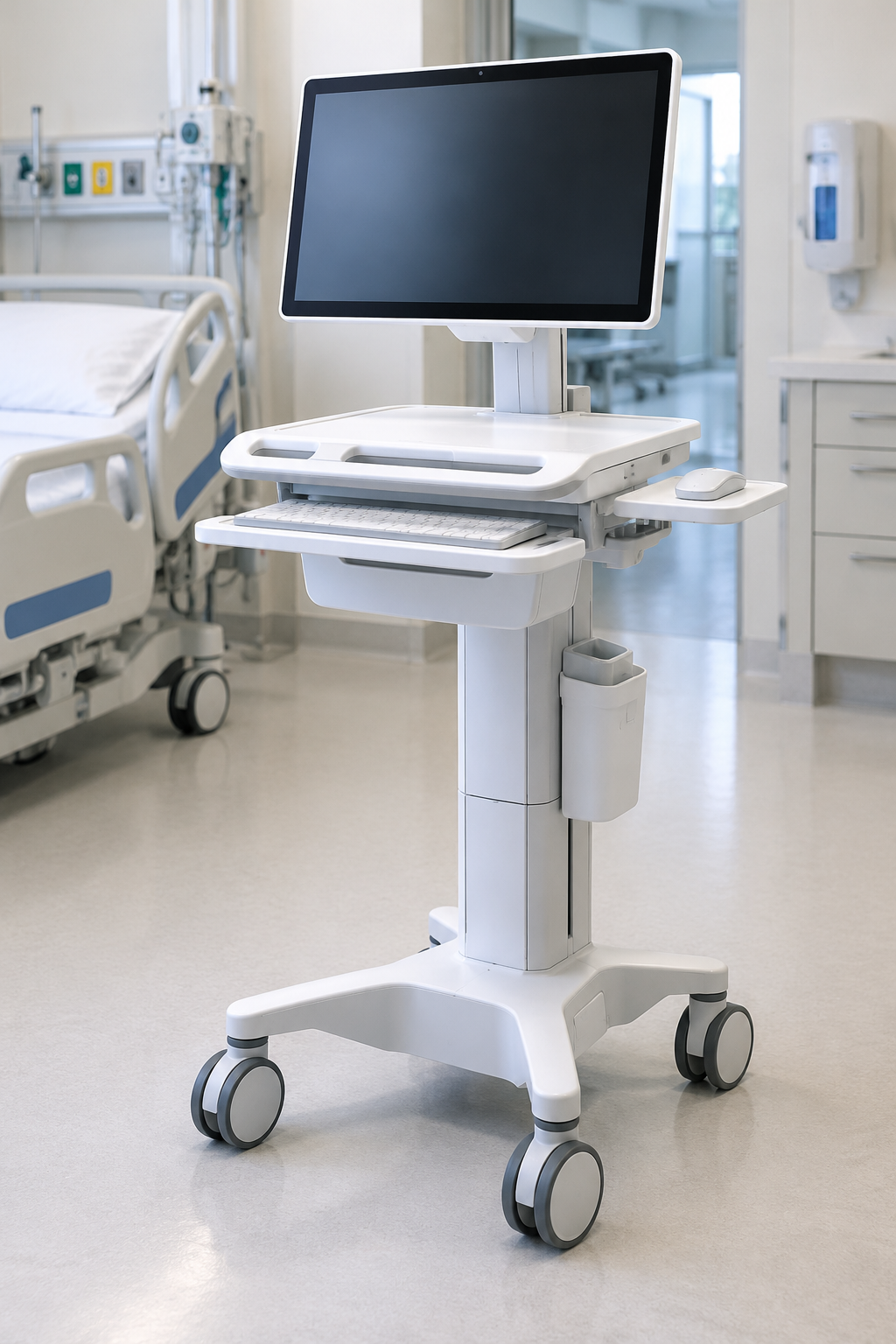
Which medical-grade computers can I buy in Nigeria?
The current medical-grade computer category contains two Advantech POC-4 series products. The POC-421 result is the 21.5-inch all-in-one point-of-care computer, while the POC-424 result is the 23.8-inch version. Advantech positions the series for nursing-cart and point-of-care applications.
Read moreWhat does medical-grade mean for a point-of-care computer in Nigeria?
“Medical-grade” is a product description, not a complete procurement decision. Advantech markets the POC-421 and POC-424 as medical all-in-one computers for nursing carts and point-of-care environments. The manufacturer describes features such as fanless designs, touch displays and optional modules. Those statements help identify the platform, but they do not establish that every part number is suitable for every clinical room or compatible with every peripheral.
Read moreWhich Advantech POC-421 medical computer is listed in Nigeria?
Franance lists the Advantech POC-421 medical all-in-one computer. Advantech’s POC-421 product information identifies it as a computer for nursing-cart and point-of-care applications. Manufacturer material describes a 21.5-inch Full HD projected-capacitive multi-touch display. The POC-4 series information also describes a fanless design and M.2 expansion, with optional connectivity and peripheral modules.
Read moreBuy Medical-Grade Computers in Nigeria
Direct answer: Franance lists two Advantech medical all-in-one point-of-care computers in Nigeria: the 21.5-inch POC-421 and the 23.8-inch POC-424. To request a quote, specify the exact hardware generation and part number, display size, processor, memory, storage, operating system, ports, mounting, mobility options and documentation required by your hospital. The models are configurable; the series name alone does not identify the complete workstation or prove that a particular option is included. Franance handles quote orders by contacting you after receiving the enquiry. There is no online payment. Review the exact configuration and included accessories in writing before proceeding.
Which medical-grade computers can I buy in Nigeria?
The current medical-grade computer category contains two Advantech POC-4 series products. The POC-421 result is the 21.5-inch all-in-one point-of-care computer, while the POC-424 result is the 23.8-inch version. Advantech positions the series for nursing-cart and point-of-care applications.
These are configurable computer platforms rather than a promise of one fixed bundle. Product generations, processors, memory, storage, operating systems, ports, wireless modules, identification readers, cameras, batteries and mounting details can differ. Request the exact part number and current specification sheet for the version proposed for your facility. Do not assume that a photograph or a family page describes every offered configuration.
What does medical-grade mean for a point-of-care computer in Nigeria?
“Medical-grade” is a product description, not a complete procurement decision. Advantech markets the POC-421 and POC-424 as medical all-in-one computers for nursing carts and point-of-care environments. The manufacturer describes features such as fanless designs, touch displays and optional modules. Those statements help identify the platform, but they do not establish that every part number is suitable for every clinical room or compatible with every peripheral.
Review the specific configuration against its intended job. A workstation used for charting, viewing images, medication workflows or connection to a medical device may have different software, network, electrical-isolation and mounting requirements. Involve the hospital’s biomedical engineering and IT teams early; include infection prevention and electrical-safety reviewers where relevant. Have them assess the complete installed system, including computer, power supply, cart or arm, peripherals, network connection and software.
Advantech’s published material should be read as evidence about its named product or series. It is not an installation approval, a Nigerian regulatory determination or a guarantee of clinical-workflow compatibility. Confirm which exact model documentation accompanies the offered item.
Which Advantech POC-421 medical computer is listed in Nigeria?
Franance lists the Advantech POC-421 medical all-in-one computer. Advantech’s POC-421 product information identifies it as a computer for nursing-cart and point-of-care applications. Manufacturer material describes a 21.5-inch Full HD projected-capacitive multi-touch display. The POC-4 series information also describes a fanless design and M.2 expansion, with optional connectivity and peripheral modules.
POC-421 has appeared in more than one hardware generation. Processor, memory, storage, operating system, ports, battery package, ingress protection and documentation must be checked against the exact part number. Do not combine a processor from one version with a rating or image from another. Request the current datasheet and a written configuration schedule before comparing the POC-421 with another workstation.
If the computer is intended for a cart, tell Franance whether it will run on mains power, battery power or both, what cart or arm will carry it, and which peripherals must connect. Confirm required LAN, serial, USB, video and wireless interfaces from the actual product specification rather than assuming a port is present because another POC-421 configuration has it.
Which Advantech POC-424 medical computer is listed in Nigeria?
Franance lists the Advantech POC-424 medical all-in-one computer. Advantech’s official POC-424 page describes a 23.8-inch Full HD touch display for nursing carts and point-of-care use. The manufacturer lists M.2 expansion and optional wireless, identification, camera and battery configurations. Exact details vary by generation and part number.
For example, the manufacturer’s 12th-generation datasheet lists particular processor, memory, storage and interface combinations for that revision. It should not be used to assume the same configuration for every POC-424 currently offered. Ask for the complete suffix, CPU generation, RAM, storage, operating system, interface schedule, power arrangement and applicable documents for the exact proposed device.
Consider whether the wider screen adds value for the target workflow and available mounting space. Check display position, viewing angle, cable routing, cart load and cleaning access with the facility team. If an optional battery or accessory is required, ask for its exact reference and whether it is part of the quoted bundle.
How do I compare the POC-421 and POC-424 in Nigeria?
Start with the screen and the physical installation: POC-421 is listed with a 21.5-inch display; POC-424 with a 23.8-inch display. Then compare only the exact configurations being quoted. Advantech’s POC-4 selection guide shows that the family has multiple standard and battery configurations and generation-specific processor options. A series-level comparison is useful for building a shortlist, but the current model suffix and datasheet should control the final specification.
| Decision point | POC-421 | POC-424 |
| --- | --- | --- |
| Display class listed by Advantech | 21.5-inch | 23.8-inch |
| Product role | Medical all-in-one for point-of-care and nursing-cart use | Medical all-in-one for point-of-care and nursing-cart use |
| Hardware generation | Confirm against offered part number | Confirm against offered part number |
| Battery, modules and mounting | Specify; verify exact bundle | Specify; verify exact bundle |
| Medical electrical and EMC documents | Request for exact configuration | Request for exact configuration |
The table is a high-level distinction only. It is not a bill of materials or confirmation that a unit includes a cart, battery, camera, reader, software licence, accessories or installation. Ask for a line-by-line quote so teams can compare equivalent configurations.
How should I plan a medical computer for a cart or bedside workflow?
Write down the task before choosing options. Identify the application the workstation will run, the users, the room or ward, where it will be mounted, how it will be powered and which systems it must connect to. Have the IT team specify network access, device management, cybersecurity and operating-system lifecycle needs. Have biomedical engineering assess any connection to medical devices, electrical separation, cleaning and service requirements. Confirm whether the computer must move between rooms or remain at one station.
For a mobile workstation, review cart compatibility, mounting pattern, cable strain relief, screen reach, weight distribution, battery runtime and the method for charging or changing batteries. The computer’s option sheet does not by itself confirm that a selected cart can support the assembly. Consider the complete load and facility workflow, then request drawings or mechanical details for the proposed mounting arrangement.
For a fixed desk or wall installation, confirm available space, VESA pattern, viewing position, access for service and the route for data and power. If a touch display is used with gloves or other input devices, test the intended interaction using the software and protective accessories that will actually be deployed. Treat these as project acceptance questions, not assumptions based on the catalogue image.
Which connections and software details should I specify?
Create an interface list with the IT and biomedical teams. Record the number and type of LAN, COM/serial, USB, HDMI or other video connections required, along with any isolated interfaces or module options. Advantech’s POC-424 specification, for example, lists several ports and optional expansion choices, but the number and isolation characteristics belong to a specific configuration. Check the POC-421 or POC-424 documentation for the exact part being offered.
Specify the processor, memory, storage capacity, operating system and software image expected by the hospital. Confirm whether the required operating system is available on that hardware revision, who supplies and installs the software, how updates and device management will work, and whether the application vendor supports the selected platform. Do not infer compatibility from the computer’s use in another facility or from a generic series description.
If wireless, Bluetooth, RFID, smart-card reading, a camera or a battery is required, identify it explicitly and request its model or part number. Ask whether it is built in, separately installed or supplied as an accessory, and whether any driver, licence or configuration work is included. The quote should make optional items and exclusions visible.
What medical electrical and EMC documents should I request?
Advantech materials reference medical electrical safety and electromagnetic compatibility standards for particular POC configurations. When procuring a unit, request the declaration, test or certification documents that apply to the exact model suffix and hardware revision. Ask the manufacturer or supplier to identify the standards and editions covered, the applicable market, and any conditions or limitations in the document. Confirm the relevant requirements with the hospital’s biomedical engineering and electrical-safety professionals.
A specification page that names a standard is not enough to establish that every item in a family has identical evidence, or that the installed workstation will meet the facility’s requirements. The computer may be connected to a display accessory, peripheral, cart, network or medical device; reviewers should consider the completed arrangement and intended use. Do not describe the entire combination as certified unless the documentation explicitly supports that exact combination.
This guide does not interpret Nigerian regulations or substitute for a project-specific review. Ask the responsible Nigerian professionals to identify local requirements and the records needed for acceptance. Keep the chosen model’s datasheet, labels, declarations, manuals and configuration schedule with the procurement file.
How do I check cleaning, mounting, power and accessories?
Advantech describes the POC-4 family as fanless and lists hygiene-oriented design features, but confirm the actual ingress-protection rating and cleaning instructions for the selected revision. Review the manufacturer’s instructions for permitted agents, surfaces, openings and cleaning method. A product’s front-panel rating, where stated, should not be treated as the rating of every enclosure surface, connector, power supply or accessory. Have infection prevention review the local protocol and mounting plan.
Check the required mains voltage and power adapter, cable and outlet arrangement. For battery versions, clarify battery quantity, capacity, charging method, hot-swap behaviour, operating conditions and replacement availability from the specific documentation. Ask who supplies the cart, mounting plate, power distribution and cable management. Confirm whether these parts are in the quotation or sourced separately.
Do not rely on a rendered image to determine the parts included. It may show a family design rather than the selected bundle. Request a configuration sheet with exact model codes for the computer, battery, module, mounting components and any requested peripherals, along with the applicable manuals and warranty terms.
What should an Advantech medical computer quotation include?
Send Franance the POC-421 or POC-424 model, exact part number if known, quantity and delivery location in Nigeria. State the workflow and preferred screen size, whether the system is mobile or fixed, mounting requirements, intended power source, operating system and software constraints. Attach an interface schedule covering network, serial, USB, video, wireless and any medical-device connections. List required modules, battery, camera, RFID or smart-card reader, accessories and documentation.
Ask the quote to state the exact hardware generation, processor, memory, storage, display, touch type, ports, operating system, power supply and included accessories. Request the manufacturer documents for that configuration, plus any installation, mounting, setup or acceptance work required. Have the facility team review compatibility and responsibilities before placing an order.
Franance should itemize delivery, lead time, warranty, service and any local support terms in writing. These details can depend on the proposed supply and must be confirmed for your location. Franance receives an enquiry and follows up by phone or email; the site does not take online payment.
Where can I request medical-grade computers in Nigeria?
Use the medical-grade computer category to compare the current POC-421 and POC-424 listings, and the Advantech brand page for the wider brand catalogue. Open the POC-421 filtered result or POC-424 filtered result to keep the model and category together.
To request a quote, provide your configuration, quantity, facility city and state, interfaces, mounting and mobility requirements, software environment and documentation checklist. Ask for confirmation of the exact part number and what is included before comparing proposals. Franance will contact you after receiving the request and clarify the commercial terms. There is no direct online checkout.
Common questions
Which medical-grade computers can I request from Franance?
The category lists the Advantech POC-421 and POC-424 all-in-one point-of-care computers. Confirm the exact part number, generation and included options in the quotation.
What is the main difference between the POC-421 and POC-424?
The POC-421 is listed with a 21.5-inch display and the POC-424 with a 23.8-inch display. Processor, modules, battery, ingress rating and other specifications depend on the exact hardware generation and part number.
Do these computers include a cart, battery, camera or RFID reader?
Not necessarily. Advantech lists optional configurations and accessories. Ask the quote to itemize the exact computer, mounting, battery, camera, identification and wireless modules.
Does a medical-computer label prove the workstation is suitable for every hospital use?
No. Verify the exact part's electrical and EMC documentation and assess the complete workstation, peripherals, network, mounting and intended workflow with the hospital's biomedical engineering, IT and safety teams.
Can I buy an Advantech POC computer online in Nigeria?
Franance accepts quotation requests rather than online payment. Send the model, configuration, quantity and facility location; Franance will follow up by phone or email.
Request an Advantech medical computer quotation from Franance.
Send the POC-421 or POC-424 model, exact hardware revision, quantity, screen preference, intended workflow, mounting, interfaces, modules, software constraints, facility city/state and required documentation. Ask for the complete configuration and commercial terms in writing. Franance will follow up by phone or email.
Request a medical computer quotationNeed an equipment quote?
Add the models you need to a quote order, or send us your equipment list.