Buy Bio-Rad ChemiDoc Go 12018025 in Nigeria: Gel and Western Blot Imaging
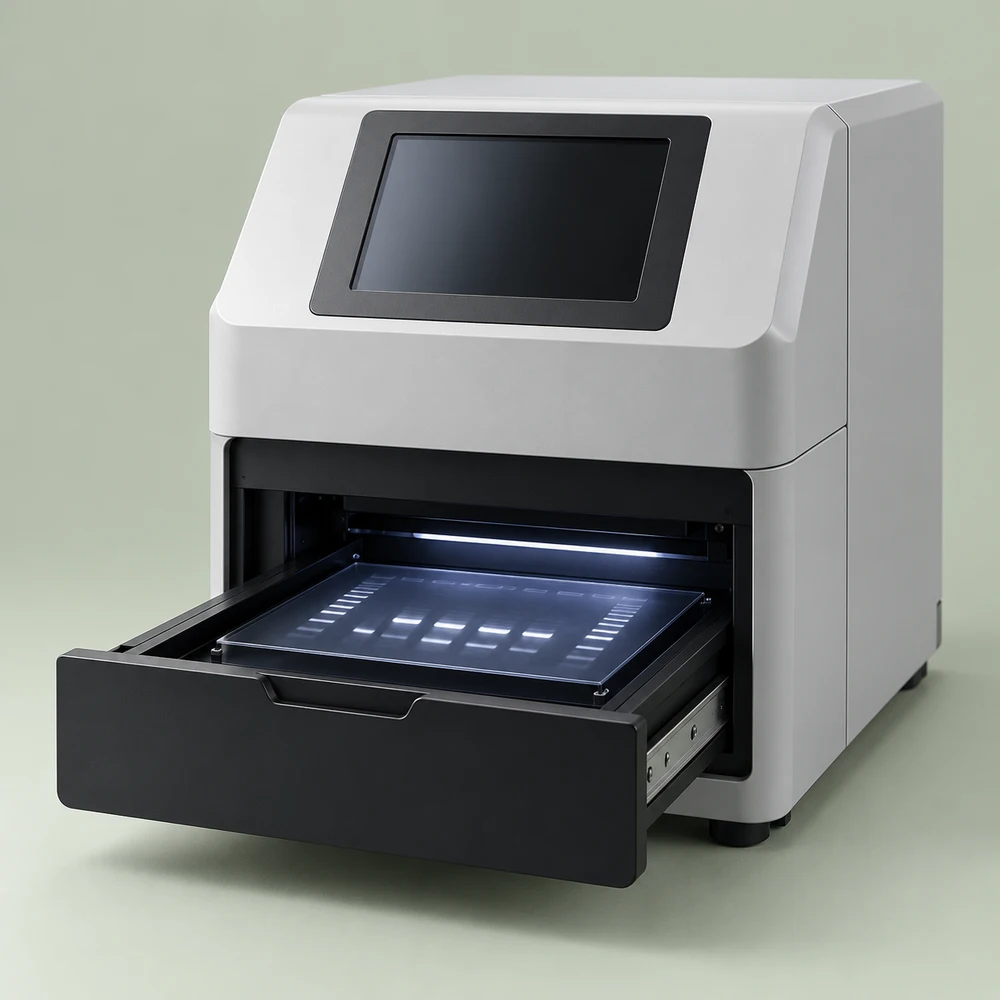
To buy the Bio-Rad ChemiDoc Go Imaging System, catalogue number 12018025, in Nigeria, match the system to your gel or blot workflow and confirm which imaging trays, software and data tools are included. Bio-Rad describes it as a research-use-only imaging system for selected chemiluminescent, fluorescent and colorimetric blots and gel applications. Franance accepts quote orders rather than online checkout. Send your intended stains and blot methods, tray requirements, software and data-export needs, quantity and destination; Franance will follow up by phone or email to clarify the requested package. Local availability, price, warranty and support must be confirmed for the actual offer.
Where can I buy ChemiDoc Go 12018025 in Nigeria?
Start with the Bio-Rad ChemiDoc Go product listing, review the Bio-Rad brand page, and browse the imaging systems category or gel documentation systems category. The Bio-Rad-filtered gel documentation listing connects the instrument to related Bio-Rad products in the catalogue.
Franance uses an enquiry and quotation process. A quote order is not an online payment and does not reserve stock. Include the exact number 12018025, your detection method, gel or blot type, required tray, software and accessories, data storage destination, quantity, target delivery date and city or state. If this is a replacement system, mention the existing imager and image analysis workflow so the proposed scope can be compared with what the lab already uses.
| Quote detail | What to specify |
|---|---|
| Catalog identity | ChemiDoc Go 12018025; verify model and package |
| Methods | Chemiluminescent, fluorescence, colorimetric, gel or blot workflows |
| Trays and software | UV/Stain-Free tray, optional white/blue trays, licenses and export |
| Site and data | Power, bench, network, USB and institutional data policy |
| Handover | Delivery, training, IQ/OQ, warranty, service and accessories |
What is the ChemiDoc Go 12018025 used for?
Bio-Rad describes ChemiDoc Go as a compact imager for DNA and protein gels and western blots. The manufacturer’s current product information describes chemiluminescent detection, colorimetric imaging and fluorescence with StarBright Blue 520 and 700 antibodies, alongside selected nucleic-acid and protein gel stains and Stain-Free gels and blots. It is intended for research use only and is not for use in diagnostic procedures. Do not position the system as a clinical diagnostic instrument or rely on it to make patient-care decisions.
The system has an onboard camera, internal computer and Image Lab Touch Software, according to Bio-Rad’s product information. The manufacturer describes a CMOS detector and application-specific imaging trays. The workflow usually involves selecting the appropriate tray and acquisition method for the sample, capturing an image and exporting it for analysis. The exact exposure, sensitivity and image quality depend on the sample, reagents, tray, imaging settings and workflow. Published capabilities do not guarantee results for a particular antibody, stain or assay.
Before purchasing, identify the most common applications your team performs. A western blot imager, a nucleic-acid gel documentation system and a fluorescence imager may overlap in hardware but require different filters, excitation sources, trays, sample stains and software workflows. Ask the supplier to confirm your exact protocol against the current Bio-Rad guide and to list the compatible sample tray and accessory set.
What applications and detection modes should I specify?
For chemiluminescent western blots, state the substrate, membrane and expected signal range. For fluorescent blots, identify the fluorophores and whether they are compatible with the system’s supported StarBright Blue channels. For colorimetric blots and protein gels, specify the stain. For nucleic-acid gels, name the dye or stain and the required illumination. Bio-Rad lists several application families, but the complete compatible list depends on the selected tray and current protocol guidance.
The ChemiDoc Go uses all-LED illumination, according to Bio-Rad literature, with trans- and epi-illumination sources. These sources support selected workflows using UV, blue, amber and green light. Bio-Rad says Smart Tray Technology recognizes application-specific trays and adjusts imaging parameters and software options. That feature makes tray selection important: an imaging system cannot capture every chemistry optimally with one tray. List the stains, sample types, fluorescent labels and number of channels required when you request a quote.
Bio-Rad describes up to four mini-gels or blots at once and a maximum image area of 21 × 14 cm in its literature. Check whether your gels, membranes, trays and sample holders fit inside that imaging area. Confirm the maximum sample thickness and any equipment clearance using the current specification sheet. If your lab needs larger gels or multiplex methods beyond the Go system’s documented channels, compare another product before selecting this model.
Which imaging tray comes with catalog number 12018025?
Bio-Rad’s product listing states that the ChemiDoc Go package includes a UV/Stain-Free sample tray. It lists White and Blue sample trays separately. The UV/Stain-Free tray supports specified Stain-Free gels and blots, fluorescence blots and certain gel stains; the White tray is used for stains such as Coomassie Blue and other visible colorimetric applications; and the Blue tray supports certain nucleic-acid stains and StarBright fluorescence applications. Confirm the exact supported application and tray version from current Bio-Rad documentation.
Do not assume that “ChemiDoc Go” in the equipment title means all three trays are in the quote. Ask that each tray appear as either an included item or an optional line with its catalog number. If the lab uses multiple methods, compare the cost and storage of the additional trays with the expected frequency of each workflow. Specify the UV shield or other safety accessories if your procedure requires them, and ask whether they are included or separate.
For a new or shared laboratory, make a simple method-to-tray matrix before ordering. List the sample, stain or fluorophore, illumination mode, tray, image format and analysis steps. Give that matrix to Franance and ask that the quotation state what is supplied to support each method. The procurement team can then verify that critical trays and accessories are not missing from the proposed system.
What detector, image area and operating requirements should I check?
Bio-Rad technical information lists a 20.48 MP CMOS detector and a maximum image area of 21 × 14 cm. The manufacturer also lists a 9.7-inch touchscreen, a multitouch interface and an onboard computer. These figures help with initial comparison, but they do not guarantee a specific image resolution in every mode or establish the limits of a particular assay. Confirm file formats, bit depth, dynamic range, output method and application support from the specification sheet and current user guide.
The published system dimensions are approximately 36 × 48 × 36 cm (width × depth × height) and weight about 21.3 kg. Its listed electrical input is 100–240 VAC at 50–60 Hz. Bio-Rad publishes an operating range of 10–28°C and 20–80% relative humidity without condensation. Check the actual nameplate, room temperature and circuit before installation; keep space for ventilation, the sample tray, the touchscreen and safe UV operation. Plan the path from the delivery point to the bench as well as the final footprint.
Ask your IT team how image data will move from the internal system to a network location, USB device or approved cloud service. Bio-Rad describes BR.io connectivity for image storage and sharing in product literature, but feature availability, account, region and institutional approval should be confirmed. If a network or cloud connection is prohibited, specify a local data-transfer workflow and confirm the supported export formats. Do not assume that a cloud account or desktop analysis license is part of catalog number 12018025.
What software is included, and what may be optional?
Bio-Rad lists Image Lab Touch Software onboard with catalog number 12018025. The system software supports image acquisition and basic workflow steps such as adding notes and exporting or printing. Bio-Rad separately describes Image Lab Desktop Software for deeper analysis on Mac or PC. Security Edition is a separate software product, with licensing options listed in Bio-Rad materials. It is not the same as the onboard touch interface, and regulatory statements for one software edition must not be generalized to all configurations or jurisdictions.
If your lab needs lane and band analysis, total-protein normalization, image annotation, user permissions or security settings, state those requirements. Ask the quotation to identify the software version, license type, supported computer operating systems, user count and export formats. Confirm whether desktop software, a USB installer, security module or license key is included. If your workflow needs a validated audit trail, confirm the specific software configuration and applicable requirements with your institution’s quality and regulatory leads.
The official product information lists a computer and touchscreen within the system. This does not mean an external computer, printer, desktop license, network storage or analysis workstation is included. Ask for the bill of materials and separate quotes for software or accessories so the lab can budget the full workflow rather than only the imager.
How should a Nigerian laboratory plan installation and training?
ChemiDoc Go is a benchtop instrument, but safe placement and operation still need planning. Confirm bench load capacity, accessible electrical supply, environmental limits, ventilation clearance and safe placement of the UV shield. The user guide should be available to staff before the first run. If your laboratory has multiple users, name the staff who need training on tray selection, imaging, exposure, image export, cleaning and safe UV handling.
Ask whether the quote includes delivery inside the facility, unpacking, setup, installation, operational training or an installation/operational qualification kit. Bio-Rad lists an IQ/OQ kit as an accessory in its materials; its presence is not implied in the basic system price. If your laboratory’s quality system requires IQ/OQ, request the exact kit and service scope, then confirm who conducts the qualification and what records are provided.
Set acceptance criteria before the instrument arrives. These may include confirming the supplied catalog number, software startup, tray recognition, image capture using a representative sample, saved file transfer and delivery of manuals and accessory records. Agree whether the supplier or laboratory provides sample gels, blots, reagents and test records. The criteria should be based on the use intended by the lab and the manufacturer’s instructions, not an assumed clinical performance claim.
What should I check for use in Nigeria?
Confirm the actual electrical supply and plug, humidity and temperature in the intended room, customs and delivery requirements, and the exact regional software and accessory package. Bio-Rad’s online product content warns that product availability may be limited by region and directs customers to confirm availability locally. It does not establish current availability of catalog 12018025 in Nigeria. Ask Franance for written confirmation of source, delivery date, warranty provider, service terms and any required import documentation.
Verify whether a particular regulatory or import requirement applies to this research-use-only imaging system and transaction with the relevant Nigerian authorities and qualified advisers. NAFDAC’s medical-device registration guideline is relevant to products within its regulatory scope, but this guide does not state that this instrument is registered or that every research instrument falls within the same path. Confirm the classification and documentation for the actual product and importer.
In a grant or public procurement, align the quote with the required compliance documents, delivery conditions and acceptance tests. Include the receiving institution, funding timeline, delivery access, number of instruments and required currency or quote validity. Ask for line items covering the system, trays, optional shield, software licenses, installation, training, warranty and service so the approving team can see what the quote actually includes.
What does ChemiDoc Go 12018025 cost in Nigeria?
Franance does not publish a confirmed online price for ChemiDoc Go 12018025. The final quote can vary with the instrument package, additional trays, UV shield, desktop or Security Edition software, installation, IQ/OQ scope, training, delivery, warranty and destination. A system with one tray should not be compared with an offer that includes a multi-application tray package without comparing line items.
For a useful quote, send your exact methods, stains, sample dimensions, number of trays, data export and software needs, installation location, quantity and required delivery date. Ask the offer to state price validity, availability, condition, delivery assumptions, included software and accessories, warranty and support exclusions. Franance will follow up by phone or email to clarify the quote order. No stock, price or regional supply is implied by this guide.
How do I request a ChemiDoc Go quote from Franance?
Use the Bio-Rad ChemiDoc Go 12018025 product listing or contact Franance about this imaging system. Include the full catalog number, blot and gel applications, stains and fluorophores, tray set, image area, software and license needs, output workflow, site power, installation and qualification, quantity and destination city or state.
Franance will contact you by phone or email to clarify the quote order and prepare a written proposal. Before approval, verify the exact catalog number and research-use-only status, included UV/Stain-Free tray, optional tray prices, software licenses, data path, installation, training, availability, warranty and service terms. The Bio-Rad brand page, imaging systems category and gel documentation systems category connect this product to the broader Franance catalogue.
Manufacturer references
- Bio-Rad ChemiDoc Go catalog 12018025 product page - Bio-Rad ChemiDoc Go specifications and ordering information - Bio-Rad ChemiDoc Go user guide - NAFDAC medical-device registration guideline
Common questions
Is ChemiDoc Go 12018025 a diagnostic instrument?
No. Bio-Rad labels the system for research use only and not for diagnostic procedures.
Which sample tray is included with catalog 12018025?
Bio-Rad lists a UV/Stain-Free tray in the package. White and blue trays are separately listed; confirm all supplied tray catalog numbers in the quote.
Can I buy ChemiDoc Go online from Franance?
No. Franance accepts quote orders and follows up by phone or email to confirm the package and written terms.
Request your ChemiDoc Go quotation from Franance.
Request a quotation from Franance for Bio-Rad ChemiDoc Go 12018025 in Nigeria. List the exact blot or gel workflows, sample trays, software and data requirements, site power, quantity and destination. Franance will follow up by phone or email to clarify the quote order and confirm the package, availability and written terms.
Choose quantity