

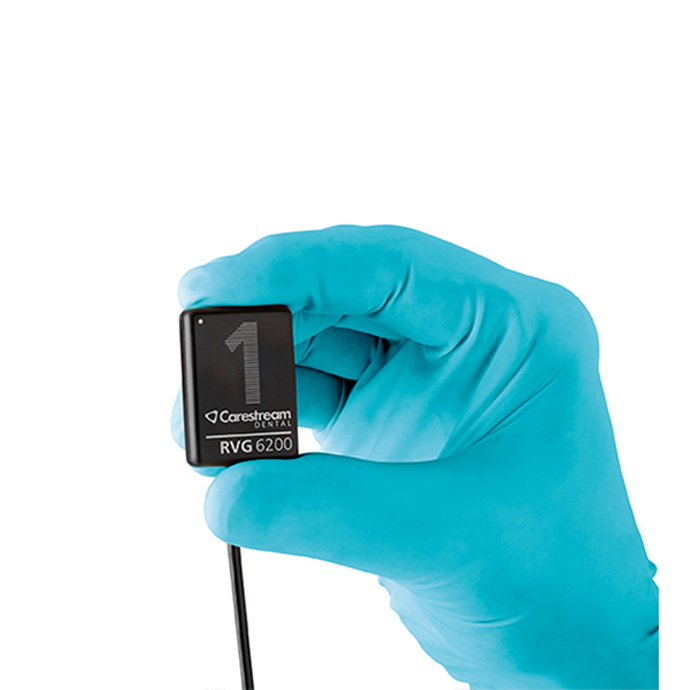
Buy Carestream Dental RVG 6200 Intraoral X-Ray Sensor in Nigeria
To buy a Carestream Dental RVG 6200 intraoral X-ray sensor in Nigeria, request a Franance quotation that specifies sensor size 1 or 2, the complete kit contents, the existing intraoral X-ray generator, workstation and imaging software, USB setup and required positioning accessories. Carestream identifies the RVG 6200 as a wired digital intraoral sensor with USB 2.0, a 5 V USB interface, two sensor sizes and a stated true resolution of 24 line pairs per millimetre. The sensor is a detector: it does not include an X-ray generator or automatically integrate with every computer or dental software package. The Franance listing is quote-only, not online checkout.
Where can I request an RVG 6200 quote in Nigeria?
Review the Carestream Dental RVG 6200 listing filtered to dental X-ray sensors, then submit the Franance RVG 6200 quotation enquiry. Include the clinic’s full delivery address, quantity, the selected sensor size, current generator make and model, workstation and operating system, imaging software and any required accessories. Franance will follow up by phone or email after receiving the enquiry; payment is not taken on the listing.
Ask the written quote to identify the exact sensor size and part number, whether the offer is sensor-only or a complete kit, and the included USB hub, wall mount, sensor holder or positioners, hygienic sheaths and software. The Franance record identifies RVG 6200 but does not select size 1 versus size 2 or a kit SKU. Carestream’s US store shows different kit configurations and contents; those listings are not evidence that the same package is offered in Nigeria. Require the quote to list the actual components and any exclusions.
What does the RVG 6200 sensor do?
Carestream Dental describes the RVG 6200 as a digital intraoral X-ray sensor that captures images when used with an intraoral X-ray source and imaging software. It converts the exposure into a digital image and connects to a computer over USB 2.0; Carestream’s product page lists a 5 V DC input through the USB interface. The sensor does not generate X-rays. It should therefore be purchased as part of a complete imaging workflow that includes a suitable generator, compatible computer and supported acquisition software.
The product page identifies a CMOS sensor with scintillator and optical fibre technology, a 19-micron pixel dimension, 4096 grey levels (12-bit) and 24 lp/mm true measured resolution. Those are Carestream’s published technical characteristics, not a guarantee that every image will be diagnostically adequate or that the sensor is compatible with a particular generator, technique, software version or clinical protocol. The dentist and imaging team must assess the image workflow, and the clinic must follow the applicable instructions, safety controls and quality-assurance requirements.
Carestream describes workflows for intraoral radiography and promotes features such as CS Adapt image processing and TWAIN compatibility. These describe capabilities of the manufacturer’s sensor and software ecosystem; they do not establish that every external practice-management platform is supported in a specific version. Ask Carestream to confirm the exact software edition and integration method for your current system before ordering.
How do RVG 6200 size 1 and size 2 differ?
Carestream offers the RVG 6200 in sensor sizes 1 and 2. Its technical specifications list size 1 active area as 22.2 by 29.6 millimetres and overall dimensions as 32.2 by 44.3 by 7.3 millimetres. Size 2 active area is 26.6 by 35.5 millimetres and overall dimensions are 32.2 by 44.2 by 7.3 millimetres. Both sizes are listed with the same pixel dimension and 24 lp/mm true measured resolution. Choose a size based on the clinic’s imaging workflow and positioning requirements, not by resolution alone.
Ask the dentists and radiography staff which sensor format they use for their routine views and how the clinic handles patient fit, positioning holders and examination templates. If more than one size is needed, list each size as a distinct line item with its own SKU, cable and accessory set. Carestream’s US catalogue lists individual size 1 and size 2 kits as well as bundles and double-sensor packages. Do not assume a dual-size kit or a specific package quantity is included with the Franance record.
The size description does not mean the sensors have interchangeable active areas or that one is a substitute for the other in every positioning scenario. Ask Carestream to confirm the correct holder and template accessories for the selected size. If the clinic already has sensor holders or sheaths, check size and compatibility with Carestream before assuming they can be reused.
Is the RVG 6200 compatible with an existing dental X-ray generator?
The sensor is an image receptor, while the intraoral generator provides the X-ray exposure. Compatibility therefore depends on the generator and its settings, as well as the sensor, software, workstation and the clinic’s required workflow. Carestream’s user guide directs users to follow the instructions for the X-ray source and select exposure settings for the region and patient type. It also emphasizes that suggested example times are tied to stated source conditions and need adjustment for the actual generator. This guide does not recommend exposure settings.
Before quoting, provide the generator’s manufacturer, model, serial or revision where available, tube voltage and current specifications, timer range, exposure controls, mount type and current maintenance status. Ask Carestream or the supplier to confirm the generator’s compatibility with RVG 6200 and what exposure-setting table or validation steps apply. Do not infer compatibility from the fact that the generator is intraoral or because another digital sensor works with it.
If the generator is new, refurbished or being replaced, request a separate compatibility review that covers the generator, sensor, holder system, workstation and imaging software. Ask which party will configure the sensor and test image acquisition. A sensor alone is not a complete dental X-ray room installation, and the Franance catalogue record does not include an X-ray generator or room-shielding project.
Which computer, USB and software requirements should I check?
Carestream’s RVG 6200 product page lists USB 2.0 high-speed interface, Type-A connector and 5 V DC input through USB. The manufacturer’s RVG user and installation documentation says the sensor operates with Carestream Imaging Software and describes TWAIN compatibility for using supported third-party imaging software. The exact software release, operating-system support, computer requirements and supported integration need to be confirmed against the current Carestream documentation before purchase.
Provide the workstation make, model, operating system and version, available USB ports, security policy, administrator access, graphics/display details, storage and backup approach. Ask Carestream whether the existing computer meets the current requirements and whether the sensor connects directly, through a supplied hub or through a different approved arrangement. A published product page’s USB interface does not ensure that every USB port, hub or workstation configuration is supported.
Name the software that will manage patient records and images. If it is CS Imaging, ask which current version is required and what license, activation or workstation setup is included. If the practice uses another imaging or practice-management application, ask Carestream to confirm TWAIN support and the relevant version, acquisition workflow and any limitations. Verify patient matching, image transfer, backup, permissions and retrieval in a test environment with the clinic’s IT lead. Do not assume a marketing statement such as “integrates easily with most software” means a named application has been tested in your specific deployment.
What does a complete RVG 6200 kit include?
Carestream’s US online catalogue shows complete kits by sensor size and lists kit contents such as an RVG 6200 sensor, ClikRay ShaRing, CS-Series USB 2.0 hub, wall mount and a 50-count box of hygienic sheaths. Other listings show different combinations, including size 1 and size 2 bundles or duplicates. Those are examples of Carestream’s market-specific retail listings, not a promise about the Franance quotation or Nigerian package.
Ask for an itemized kit list with exact manufacturer part numbers and quantities. Confirm sensor size, sensor serial, USB hub or connection unit, wall mount, positioners or holder rings, hygienic sheaths, software, installation media or download access, licenses, power supply if applicable, cable and spare parts. Identify reusable accessories separately from consumables. Ask which extra sheaths and compatible holders can be ordered for ongoing use and whether the quoted accessories are compatible with the selected size.
If you already own a Carestream system, describe the model, software release and accessory inventory. Ask which components are reusable and which must be replaced for RVG 6200. Do not assume that holders, mounts, cable, USB hardware or software from an older RVG model can be reused. The manufacturer should confirm compatibility for each component.
How should I compare RVG 6200 image features and workflow?
Carestream publishes true measured resolution of 24 lp/mm and describes built-in filters for periodontic, endodontic and dentin-enamel junction imaging. It also describes CS Adapt options for adjusting contrast and sharpness, a rear-entry cable and a workflow summarized as position, expose, view. These are product functions. They do not validate a specific diagnosis, treatment workflow, software preset or patient outcome, and the clinician remains responsible for interpreting images.
Compare sensors by their verified size, active area, workstation compatibility, generator workflow, cable routing, support software, accessory package and maintenance process. Ask for a demonstration using a compatible test arrangement and the image-management workflow the practice actually uses. If the clinic is comparing the RVG 6200 with another sensor, request the current datasheet for each and compare the same technical measures rather than relying on a generic “high resolution” label.
For multi-room use, identify how many rooms and workstations need access, whether sensors will be shared or assigned, how they will be stored and cleaned, and how images will be associated with patient records. Carestream’s manual describes operating its sensors and workstations, including RVG Connect options; network arrangements vary by setup. Confirm whether an RVG Connect unit is part of the offer or a separate accessory, and validate network and IT requirements with Carestream and the practice’s IT provider.
What infection-control and handling questions should I ask?
Carestream describes the RVG 6200 as waterproof and shock-resistant and says its waterproof design supports immersion for infection control. That statement must be applied through the current manufacturer instructions for use: verify the exact disinfection process, immersion conditions, compatible chemicals, barrier sheaths, drying and inspection. Do not assume every cleaning product or sterilization method is acceptable, and do not immerse connectors, hubs or computer equipment unless the manual explicitly permits it.
Request instructions for the sensor, cable, holder, positioning accessories and protective sheaths individually. Ask about cable bend radius, strain relief, storage, transport and inspection for damage. The manufacturer describes a reinforced, flexible cable, but this does not make it immune to damage from pulling, twisting, biting or improper storage. Confirm what damage assessment or service procedure to use if the sensor is dropped, bitten or exposed to fluid.
Have the clinic’s infection-prevention lead review the proposed disposable barriers and disinfection protocol against the manufacturer instructions and local procedures. Ask whether the quote includes a starter pack of sheaths and how additional approved consumables are ordered. This guide does not certify the practice’s infection-control programme or guarantee sensor service life.
What should a Nigerian dental practice plan for installation and service?
Request current Carestream User and Installation Guide documents for RVG 6200, together with the current safety, regulatory and technical specifications guide. Ask whether the quotation includes installation, workstation software setup, generator compatibility check, test image acquisition, user orientation and handover. State the clinic’s site address, operating hours, computer details and person responsible for IT and imaging. Confirm who performs each task and what acceptance records are supplied.
Ask for the support route for Nigeria, warranty territory and duration, exclusions, repair procedure, sensor replacement approach, software support and expected service logistics. Carestream’s online store prices and kit details are US-market information and do not establish the Nigerian price, stock, import status, warranty or support commitment. Obtain those terms from Franance in the actual quote. If repairs are arranged through a third party, ask who supplies genuine parts, handles data privacy and coordinates manufacturer escalation.
At handover, record sensor serial and size, part number, installed software and driver version, workstation identity, generator identity, included holder and sheath references, image test result, cleaning documentation and support contacts. Train each relevant operator on the current instructions and local radiation-safety procedures. The manufacturer’s user guide is the authority for use and installation; this article is procurement guidance, not an operator manual.
What should I include in a Nigerian RVG 6200 quotation request?
Send the clinic name and delivery address, quantity, sensor size, and whether the request is for a sensor-only package or complete kit. Provide the intraoral generator make and model, workstation make and operating-system version, imaging software and version, third-party integration needs, available USB setup, current holders and accessories, number of operatories, network requirements and requested installation or training scope. Include the exact part number if known and identify any existing Carestream system that must interoperate.
Ask Franance to return an itemized written offer that identifies sensor size and model, kit contents and quantities, software and accessory references, compatibility confirmation, delivery scope, installation or setup responsibilities, warranty terms applicable to the Nigerian transaction and support route. Ask for the current Carestream manual and technical specification references. Confirm that the quotation does not substitute the US online store’s kit or commercial terms for the proposed local offer.
Use the Carestream Dental RVG 6200 exact filtered listing and send the request through the Franance RVG 6200 quotation form. The item is ordered through a quote enquiry with follow-up by phone or email; no online payment, local stock, price, delivery date or support entitlement is implied.
What is verified about the RVG 6200 and what remains open?
Carestream Dental’s RVG 6200 product page is the source for the device identity, sensor sizes, CMOS/scintillator/optical-fibre technology, 19-micron pixel dimension, 24 lp/mm true measured resolution, USB specifications, active areas, dimensions, image processing and TWAIN description. Carestream’s RVG 142, RVG 5200 and RVG 6200 User and Installation Guide and RVG technical and safety guide explain installation, use, safety and technical requirements. Carestream’s RVG 6200 kit catalogue demonstrates that kit contents and sizes vary by SKU; US prices are not used here.
The Franance catalogue record identifies Carestream Dental RVG 6200 and assigns it to dental X-ray sensor and dental taxonomies. It does not specify size, kit SKU, included accessories, supported local generator, computer, software, Nigerian stock, price, warranty or service arrangement. Those must be confirmed for the actual offer. No diagnostic result, regulatory status, local availability or image-quality outcome is promised by this guide.