

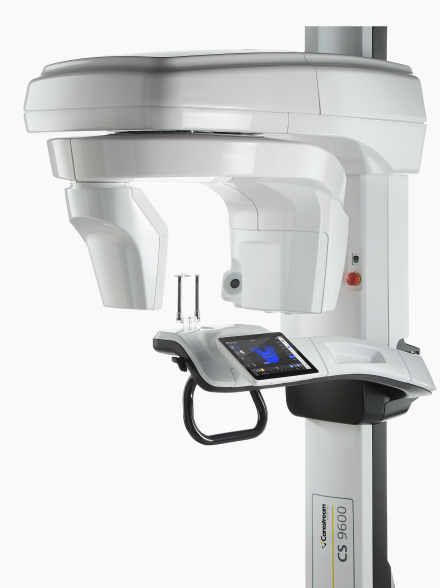
Buy Carestream CS 9600 Dental CBCT Scanner in Nigeria
To buy the Carestream Dental CS 9600 CBCT scanner in Nigeria, request a configuration-specific quotation from Franance. Carestream describes the CS 9600 as a configurable extraoral system combining 2D and 3D imaging, with up to 14 CBCT fields of view from 4 × 4 cm to 16 × 17 cm. The exact FOVs, panoramic and cephalometric components, optional 120 kV generator, positioning features, software and installation scope depend on the proposed configuration. Franance handles equipment requests by quote and follow-up; there is no online checkout. Start with the Carestream CS 9600 listing filtered to this model, or review the dental CBCT scanner category. Send your imaging requirements, room and radiation-protection status, software/integration needs, destination and requested installation scope through the Franance CS 9600 quotation enquiry.
What is the Carestream CS 9600?
The CS 9600 is a Carestream Dental extraoral imaging platform with 3D dental CBCT and model-dependent 2D imaging modalities. Carestream markets the system as a multifunctional 5-in-1 platform and describes it as combining 2D and 3D imaging. Its technical documentation identifies CBCT and panoramic modalities, with cephalometric imaging available in the Scan Ceph configuration. The actual set of functions included in a unit must be stated in the supplier’s configuration schedule.
Carestream lists a minimum CBCT voxel size of 75 µm and camera-assisted positioning features such as Live Positioning Assistant and SmartAuto on the product page. These are manufacturer specifications and feature descriptions. They do not determine whether an examination is appropriate, guarantee image quality for a particular patient, or replace professional training and clinical judgment. This guide is about defining a system and purchase scope, not offering clinical advice.
The Franance catalogue identifies the CS 9600 Dental CBCT Scanner as the product. It does not specify whether a quoted unit includes panoramic imaging, Scan Ceph, optional generator settings, seating, software, licences or third-party interfaces. Treat the model name as the starting identity, then request the exact regional configuration and all included items in writing.
Which field of view should I specify?
Carestream’s current product information lists up to 14 CBCT FOV options, from 4 × 4 cm through 16 × 17 cm. The technical specification enumerates 4 × 4, 5 × 5, 5 × 8, 6 × 6, 8 × 5, 8 × 8, 10 × 5, 10 × 10, 12 × 5, 12 × 10, 16 × 6, 16 × 10, 16 × 12 and 16 × 17 cm. Some larger volumes have an asterisk indicating “with tip of the volume.” Confirm the current FOV package and the precise permitted imaging volume for the product version and region being offered.
Do not request only “the largest field” or assume every volume comes installed. Ask the clinical lead which examinations and scan areas the practice intends to support, then request the exact FOV choices, option codes, acquisition protocols and configuration schedule from Carestream. Have the supplier say whether each option is standard, installed, licensed, optional, an upgrade or unavailable on the proposed unit. Ask what a later expansion entails and its cost, dependencies and service requirements.
Carestream product information includes an Ontario-specific note concerning conditions on dentists’ use of FOVs over 8 × 8 cm. That note describes a jurisdictional condition and is not Nigerian regulatory guidance. The clinic’s qualified professionals and project authority should identify the Nigerian requirements that apply. Manufacturer-published volume choices do not by themselves establish local authorization or that every protocol is appropriate for every patient.
What do voxel size and generator options tell me?
Carestream lists 75 µm minimum voxel size for 3D imaging. The technical specification gives an X-ray generator range of 60–90 kV, with 60–120 kV listed as an option, and 2–15 mA tube current. These specifications should be verified against the exact quoted configuration, including any generator and software options. A minimum voxel value describes a capability under defined settings; it does not mean all scans use that size or demonstrate clinical benefit on its own.
Ask the vendor to identify which tube-voltage range and focal-spot options are installed, the protocols included and the software functions associated with the proposed generator. Carestream’s product content describes features such as CS MAR and reduced beam-hardening options, but availability can be configuration-dependent. Request exact feature names and option references; do not infer they are installed from a family-level page.
The clinician or imaging lead should define the practice’s intended workflow and evaluate technical requirements. Ask Carestream for current protocol documentation and image examples for the offered system if those will inform the decision. Compare the whole configuration, not only a nominal voxel number or a promotional statement about image quality.
Does the CS 9600 include panoramic and cephalometric imaging?
Carestream’s product page describes the CS 9600 as combining 2D and 3D modalities, and its technical specification lists panoramic functions. The same documentation states cephalometric modality is available with the Scan Ceph configuration. This means the family supports these modalities, but the quoted package must identify which components are supplied and enabled.
If panoramic imaging is required, have the quotation state the panoramic sensor/configuration and enabled exam modes. If cephalometric imaging is required, specify Scan Ceph and ask for the cephalometric arm, detector, software, tracing modules and required accessories as distinct items. Confirm whether any seat or positioning hardware is part of the proposed configuration and how it affects room layout. Carestream publishes different space and weight requirements based on Scan Ceph and seat placement.
Also ask which acquisitions are licensed or activated, what computer and software are included, and what upgrades can be performed after installation. Do not assume the CS 9600’s advertised 5-in-1 label translates into a specific list of components in every regional package. The vendor’s written configuration and Carestream submittal should enumerate the actual modalities.
How do camera-assisted positioning features fit the workflow?
Carestream describes the CS 9600 as using video cameras, Live Positioning Assistant and SmartAuto features to support patient positioning and setup. Confirm the exact available feature set, training scope and positioning accessories for the version quoted. Ask for a demonstration of the workflow relevant to your clinic and for the current user documentation.
The practice should consider patient access, operator visibility and communication, staff movement, accessibility requirements and how the acquisition console will be placed. Carestream’s safety guide states the radiology room arrangement must allow visual or audio communication with the patient and access to the acquisition interface during exposure. Confirm the exact requirements in the applicable current safety documentation and local design review.
Positioning features do not remove the need for trained operators or appropriate patient selection and protocol choices. Ask who will provide equipment orientation and what is covered. Distinguish installation and application training from professional competency, radiation-safety training and clinical decision-making.
What software, workstation and network requirements should I quote?
Carestream presents CS Imaging 8 and CS 3D Imaging as parts of its imaging workflow. The CS 9600 safety and technical guide lists an acquisition computer supplied with the system and a set of minimum requirements for an image-review computer in the document revision opened for this guide. Software, operating-system and hardware specifications can change, so ask Carestream for current requirements and confirm whether the supplied package meets your proposed storage, review and expansion workflow.
Tell the supplier which imaging database, practice-management system, intraoral scanners, planning applications, workstations and storage/backup tools the clinic uses. Request written compatibility for exact software versions and interfaces. State whether images must be reviewed from multiple rooms, archived centrally, exported to another provider or linked to a particular patient record. Ask what network equipment, licences, user seats, viewing workstations and implementation services are included.
Carestream’s description of integrated software does not prove that every third-party application or existing clinic network is compatible. Ask who configures accounts, network access, backups, cybersecurity updates, storage sizing and software upgrades. If data migration or integration is part of the project, request a defined scope and acceptance criteria. Avoid buying on the basis of a general “open” or “seamless” integration statement without a compatibility confirmation for your environment.
How much room and load capacity should the clinic plan for?
Carestream lists a system weight of 210 kg without Scan Ceph and 240 kg with Scan Ceph. Its technical page gives minimum required spaces of 1,500 × 2,000 × 2,200 mm without Scan Ceph, or 2,050 × 2,000 × 2,200 mm with Scan Ceph when no seat is installed or the seat is on the left. With the seat on the right, its listed minimum is 1,900 × 2,000 × 2,200 mm without Scan Ceph and 2,290 × 2,000 × 2,200 mm with it. Verify those dimensions with the current installation drawing for the exact package, including the location of any optional seat.
Check the delivery route through the building, including entrance width, corridor turns, lift capacity, stairs and loading access. Have the building engineer review the supported floor load, mounting requirements and installation path. Plan maintenance clearances, the patient entry and exit area, operator position and associated workstations. Minimum room dimensions are manufacturer planning figures, not a complete layout or shielding design.
Carestream’s safety documentation states that the radiology unit must be installed in a room protected against X-ray emission and that the room must comply with official radiation-protection regulations. Have a qualified radiation-protection professional and the relevant Nigerian project authority determine shielding, room design and approval requirements for the actual installation. Manufacturer documentation does not establish Nigerian approval or replace a site-specific assessment.
What power and electrical details should I confirm?
Carestream’s CS 9600 technical documentation lists input voltage of 100–240 V AC at 50/60 Hz. The safety guide states the unit must be connected to a mains supply with protective earth and describes a fixed power connection. Confirm the latest requirements for the exact configuration, the supplied power components, cable route, circuit rating, isolation and protective devices with Carestream and the project electrician before site work.
Do not treat the broad voltage range as a complete installation specification. Ask whether the supplied unit requires a dedicated circuit, specific breaker or other electrical conditions, and request current installation instructions. Give the supplier the facility’s available service and room plan. Have a qualified electrician review the installation against the manufacturer’s written requirements and local electrical rules.
Include network, computer, display, backup and any optional peripheral requirements in the site schedule. Confirm which components arrive with the system and which the clinic must provide. State the destination and delivery conditions so the quote can separate equipment supply from building and electrical work.
What should the practice compare before choosing CS 9600?
Compare the exact FOV configuration, generator option, panoramic scope, Scan Ceph configuration, positioning features, software, storage and interfaces alongside room and installation requirements. The manufacturer’s broad capability list is useful for discovery, but the proposal should identify the selected feature set by model and option reference. Ask the imaging lead and facility team to review the same configuration schedule so clinical workflow and site preparation stay aligned.
If comparing with another platform such as Carestream CS 8200 3D Advance Edition, do not transfer its specifications to CS 9600. CS 9600 is a separate product with different FOVs, weight, space requirements and options. Request side-by-side manufacturer documents for the two exact configurations under consideration. Compare installed capabilities, ongoing licensing, site costs and support terms rather than platform names alone.
Confirm software version, computer supply, network interfaces, backup expectations, training, acceptance tests, warranty and support route. Ask who will perform installation and any commissioning or integration. These services and commercial details are not established by global product information and need written confirmation for the Nigerian destination.
What should a Franance quotation include in Nigeria?
Send the exact model name, quantity, state and city, intended use by the practice, selected or required FOVs, 2D modality needs, Scan Ceph requirement, generator option, software modules, workstation/network needs and room status. Include the room drawing, delivery route, floor or building access, available power details, site survey status and relevant project timelines. Identify who will approve the design and who is responsible for shielding, electrical work, networking and installation.
Ask Franance to itemise the scanner, installed imaging configuration, panoramic and cephalometric components, seat/positioning accessories, software and licences, acquisition computer, review workstations, cables, installation, application training, testing and any service proposal. Request Carestream confirmation of option compatibility, current installation requirements and the exact model/revision. State clearly which project tasks are included, excluded or supplied by another contractor.
Ask for itemised price and currency, quote validity, confirmed availability, lead time, shipping, insurance, customs and import responsibilities, delivery terms, taxes, warranty territory and service contact for the stated Nigerian destination. Franance will follow up to clarify the quote request and supply terms; the enquiry is not an online purchase or payment. No local stock, warranty, certification or service commitment is implied by this guide.
How do I request a Carestream CS 9600 quote?
Open the exact CS 9600 filtered listing, browse the dental CBCT scanner category, and send your requirements through the Franance CS 9600 quotation enquiry. Include your intended modalities and FOVs, room drawing, destination and software/interface requirements so the proposed system can be reviewed as a specific configuration.
For technical review, consult Carestream Dental’s CS 9600 product page and its Safety, Regulatory and Technical Specifications guide. The guide provides model-level technical and safety information; confirm the applicable edition and regional configuration with Carestream. The documents do not by themselves establish Nigeria-specific approval or site compliance.