

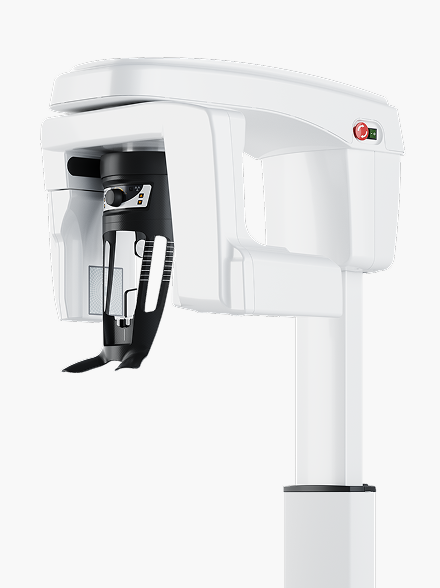
Buy Carestream CS 8200 3D Advance Edition CBCT System in Nigeria
Buy the Carestream Dental CS 8200 3D Advance Edition in Nigeria by requesting a configuration-specific quotation from Franance. Carestream describes it as a dental CBCT platform with panoramic imaging and optional cephalometric imaging. Its manufacturer-listed options include up to 11 CBCT fields of view (FOVs), from 4 × 4 cm through 16 × 10 cm, and a stated minimum voxel size of 75 µm. The exact FOV configuration, upgrade level, cephalometric arm, software and accessories must be stated in the offer. Franance processes equipment requests as quote orders and follows up by phone or email; there is no online checkout. Review the Carestream CS 8200 3D Advance Edition listing filtered to this model, or visit the dental CBCT scanner category. Send the practice’s imaging scope, room status, required configuration, destination and requested installation scope through the Franance CS 8200 3D Advance Edition enquiry.
What is the Carestream CS 8200 3D Advance Edition?
The CS 8200 3D Advance Edition is a dental extraoral imaging system built around cone-beam computed tomography (CBCT). Carestream’s product page presents the Advance Edition as an expandable platform with three upgradable FOV configurations. The product listing in Franance identifies the CBCT system and the Advance Edition by name; it does not establish which FOV tier, cephalometric module, software licences or accessories would be included in a particular supply.
Carestream’s product description lists a minimum voxel size of 75 µm. Voxel size is one technical characteristic of a 3D acquisition; it is not a guarantee of diagnostic performance or a substitute for selecting an appropriate protocol. The treating professional should determine whether a given system and acquisition meet the intended clinical workflow. This guide helps a practice specify the equipment and quote requirements; it does not provide clinical imaging advice.
The manufacturer page discusses dental CBCT, panoramic imaging and an optional cephalometric modality. It also describes image review and planning software and optional features such as CS MAR. These are platform capabilities and options. Ask the supplier to identify what is installed, licensed and included in the exact quoted unit rather than reading a family feature list as the scope of supply.
Which CS 8200 3D Advance Edition configuration should I quote?
Carestream describes three upgradeable FOV configurations for the Advance Edition. Its product page lists selectable FOVs from 4 × 4 cm to 16 × 10 cm, including 5 × 5, 5 × 8, 8 × 5, 8 × 9, 10 × 5, 10 × 10, 12 × 5, 12 × 10 and 16 × 6 cm. The manufacturer marks some selections as options and presents the system as upgradable. The quote must say which configuration is supplied initially and which upgrades, if any, are enabled or separately available.
Do not specify only “up to 16 × 10.” Tell the supplier which imaging volume or volumes are important to the practice’s planned services, then request the exact currently available configuration and the manufacturer’s written option schedule. Ask for the acquisition modes, positioning aids, software features and any licences tied to the proposed FOV. Confirm whether a later upgrade requires a purchase, software activation, hardware change, service visit or other conditions; do not assume “upgradeable” means every option is already included.
For each required volume, ask the supplier to identify the diameter and height, whether the option is installed, optional or upgradeable, and any restrictions that apply to the offered regional model. Carestream’s web page notes a specific Ontario condition for dentists using FOVs over 8 × 8 cm; that is jurisdiction-specific information and should not be applied as a Nigerian rule. Have the responsible local professional and project authority confirm the requirements that actually apply to the Nigerian site.
What does the 75-micron specification mean?
Carestream lists a 75 µm minimum voxel size for the CS 8200 3D Advance Edition. The manufacturer also promotes the system for high-resolution endodontic imaging. These statements describe manufacturer specifications and positioning. They do not mean every scan uses that voxel size, that every protocol produces the same image characteristics, or that the smallest available voxel is always the correct choice for a particular examination.
Ask the supplier to identify the scan settings, available protocols and any software or configuration dependencies relevant to the practice’s requirements. If the clinic has a specific resolution, volume or workflow requirement, include that in writing and ask Carestream to confirm it against the exact offered configuration. Have the qualified clinician determine imaging protocols and interpret the clinical suitability of the images.
If comparing models, compare the actual configuration, detector and software schedule along with voxel size. A single number does not describe total system capability, workflow fit, image review tools, patient positioning, room requirements or operational cost. The published number is a manufacturer specification, not a promise that every diagnostic task can be performed or that clinical outcomes will improve.
Does the CS 8200 include panoramic or cephalometric imaging?
Carestream’s technical information describes panoramic imaging for the platform and a cephalometric modality available with an optional cephalometric arm. The product page lists panoramic examinations and describes the optional Scan Ceph module for cephalometric imaging. The catalogue title “CBCT System” does not tell you whether a proposed unit includes the cephalometric arm, a particular panoramic setup or related accessories.
If panoramic imaging is required, ask for the exact panoramic capability and any enabled exam protocols in the quoted package. If cephalometry is required, specify the Scan Ceph configuration and request the full arm, detector, acquisition software, tracing tools, accessories and installation requirements as separate line items. Carestream lists a larger minimum space and higher system weight when the cephalometric arm is installed, so a ceph request affects room planning and logistics as well as the imaging schedule.
The product page lists panoramic exposures and cephalometric exam types, but actual use depends on installed configuration, applicable instructions, user training and local clinical practice. Confirm the functions and regional availability of each option with the manufacturer before purchase. Do not assume a cephalometric image function is part of every Advance Edition just because it appears on the platform page.
What software, planning tools and interfaces should I confirm?
Carestream describes integration with its CS Imaging and CS 3D Imaging software and says the CS 8200 3D can connect with leading intraoral scanners and dental practice imaging software. The manufacturer also describes software capabilities such as CS MAR and planning workflows. The phrase “open solution” does not identify the formats, interfaces, licences or third-party devices included with a particular system.
List the clinic’s existing systems: imaging database, practice-management software, intraoral scanners, implant-planning applications, workstations, network and image-export or archive processes. Ask Carestream to identify supported versions and connection methods for each required interface. Ask whether licences are perpetual or subscription-based, which computer is included, how many users or workstations are covered, and what is needed for remote review, backup and updates. Have the vendor confirm which software components are part of the quote and which require separate purchase.
If the practice needs an existing archive migrated or a particular image format exported, state the workflow and request a demonstration or written compatibility confirmation. Ask who configures the workstation, network, backup, user access and software updates. Manufacturer statements about compatibility with leading software do not guarantee integration with every installation or version in use at a Nigerian clinic.
How much room and structural capacity should I plan for?
Carestream lists a minimum required space of 1,200 × 1,400 × 2,400 mm without a cephalometric arm and 2,000 × 1,400 × 2,400 mm with the arm. Its listed weights are 92 kg without the cephalometric arm and 125 kg with it. These are manufacturer planning figures for the system; the project team should confirm the latest installation drawing, clearances, access route and configuration before site preparation.
Measure doorways, corridors, lifts, stairs and the receiving route, then check the room dimensions and ceiling height against the current installation documentation. Confirm floor loading, anchoring or support requirements with Carestream and the building engineer. Leave access for patient positioning, staff movement, routine cleaning and maintenance. The minimum footprint does not by itself account for the full working envelope, operator console, computer, patient access, shielding construction or local room layout.
Radiation protection must be assessed and approved for the specific room, equipment, workloads and governing Nigerian requirements by the professionals and authorities responsible for the project. Carestream’s documentation sets out manufacturer warnings and model details; it does not substitute for a site-specific shielding design, regulatory review or approval. Do not begin room construction based only on this guide or a marketing image.
What power and installation information should a Nigerian buyer provide?
The public CS 8200 3D Advance product page gives model dimensions and weight, but the exact electrical supply, installation connections, site conditions and required accessories should be taken from the current installation documents for the quoted configuration. Do not infer the power specification from another Carestream model or an online listing. Ask the supplier to provide the applicable installation guide and confirm voltage, frequency, protective earth, circuit capacity, cabling, isolation and any power-conditioning requirement in the written proposal.
Give the destination state and city, site address type, room stage, available electrical service and whether the room is new or an existing imaging room. Identify who will arrange shielding review, building work, electrical work, network access, equipment positioning and commissioning. Ask whether site survey, delivery, installation, calibration or acceptance checks, application training and handover documentation are included, and who performs each activity.
The quotation should identify installation prerequisites and any environmental requirements from the manufacturer. Ask for the exact floor plan and equipment clearances before work begins. Confirm the delivery path and local handling plan for the system’s stated weight, including any lifting equipment and access restrictions. Do not assume that a manufacturer’s international page confirms Nigerian stock, import timing, local service coverage, warranty terms or regulatory status.
What should I compare before choosing this CBCT system?
Compare the intended field of view, installed and upgrade options, panoramic and cephalometric scope, software, interfaces, room fit, patient-positioning workflow and total project package. Ask the clinical lead to determine the imaging requirements; ask the facility team to review room, power, shielding, network and delivery constraints. Have the vendor map each requirement to a model feature, option code, licence or site work item.
If comparing the Advance Edition with the Carestream CS 9600 or another CBCT system, keep the selected models separate. The CS 9600 is a different platform with its own FOV range, room dimensions, weight and available modalities. Do not transfer CS 9600 specifications or options to the CS 8200. Review each model’s current manufacturer documentation and ask the supplier to provide a side-by-side configuration schedule for the exact package being offered.
Ask the quotation to separate equipment, options, software and licences, computer hardware, accessories, delivery, site preparation, installation, training, service and warranty. Confirm local support, response route, parts arrangements, warranty territory and lead time in writing. The catalogue and product page do not establish these commercial terms for Nigeria.
What should a Franance quotation include in Nigeria?
Send Franance the exact model name, quantity, destination state and city, practice type and the expected installation date. State the required CBCT FOV configuration and upgrade path; whether panoramic imaging and cephalometry are required; desired software, planning options and licences; existing imaging systems; room dimensions; site survey status; and requested installation, training and service scope. Add room drawings and available electrical/network details if you have them.
Ask the response to list the complete system configuration and exact manufacturer references. It should identify the installed FOV tier, available upgrade options, cephalometric arm, software/modules, included computer and accessories, installation prerequisites and any separate site work. Ask the supplier to confirm which requirements need Carestream’s review and provide the current documents for planning. Specify who is responsible for shielding, electrical works, networking, installation and acceptance tests.
Request itemised price and currency, quote validity, availability, lead time, shipping, insurance, import and customs responsibility, delivery terms, applicable taxes, warranty territory and service route. These details depend on the actual offer and destination and must be confirmed by Franance in writing. Submitting a quote enquiry does not constitute an online purchase or payment.
How do I request a CS 8200 3D Advance Edition quote?
Open the exact CS 8200 3D Advance Edition filtered listing, review the dental CBCT scanner category, and send your details through the Franance quotation enquiry. Franance can follow up to clarify the room, software, modality, configuration and supply scope before issuing a quotation.
For manufacturer details, consult Carestream Dental’s CS 8200 3D Advance Edition product page and its CS 8200 3D family technical specifications. Check that the document revision applies to the exact configuration being quoted. Carestream’s international information does not prove Nigeria availability or project approval.